

You finish the proposal half an hour earlier. Then another request arrives. By the end of the day, you have produced more, but you leave at the same time. Perhaps later.
That is one perfectly plausible version of AI productivity. It is also rather different from the promise of getting your time back.
We spend a lot of energy asking how much time AI saves. I think we need to spend more on the next question: who gets to decide what happens to it? A faster task creates an opportunity. Turning that opportunity into better work requires a choice.
Gallup’s workplace productivity overview, updated on 10 November, offers a useful starting point. It reports that 65% of US employees in organisations that had implemented AI said it positively affected their productivity and efficiency in May 2026. That is a self-reported assessment of productivity, not a measurement of hours recovered. The date of the update should not make us mistake the underlying survey for new November fieldwork. [1]
A faster task can sit inside a longer day
ActivTrak’s 29 October analysis examined digital activity from 9,140 knowledge workers across 467 enterprises, between 1 April and 25 September 2026. It reported workday spans of 8.4–9.1 hours among AI users, compared with 7.6 hours among non-users. [2]
These are observational comparisons, not a randomised experiment. Different roles, workloads and working habits may help explain the gap. They do not establish that AI caused longer days. ActivTrak defines workday span as the interval between first and last recorded activity, which is not the same as continuous working time. [3]
Still, the comparison is worth sitting with. Feeling quicker at a task and having a shorter day are separate outcomes. A tool can help with the first while an organisation makes no provision for the second.
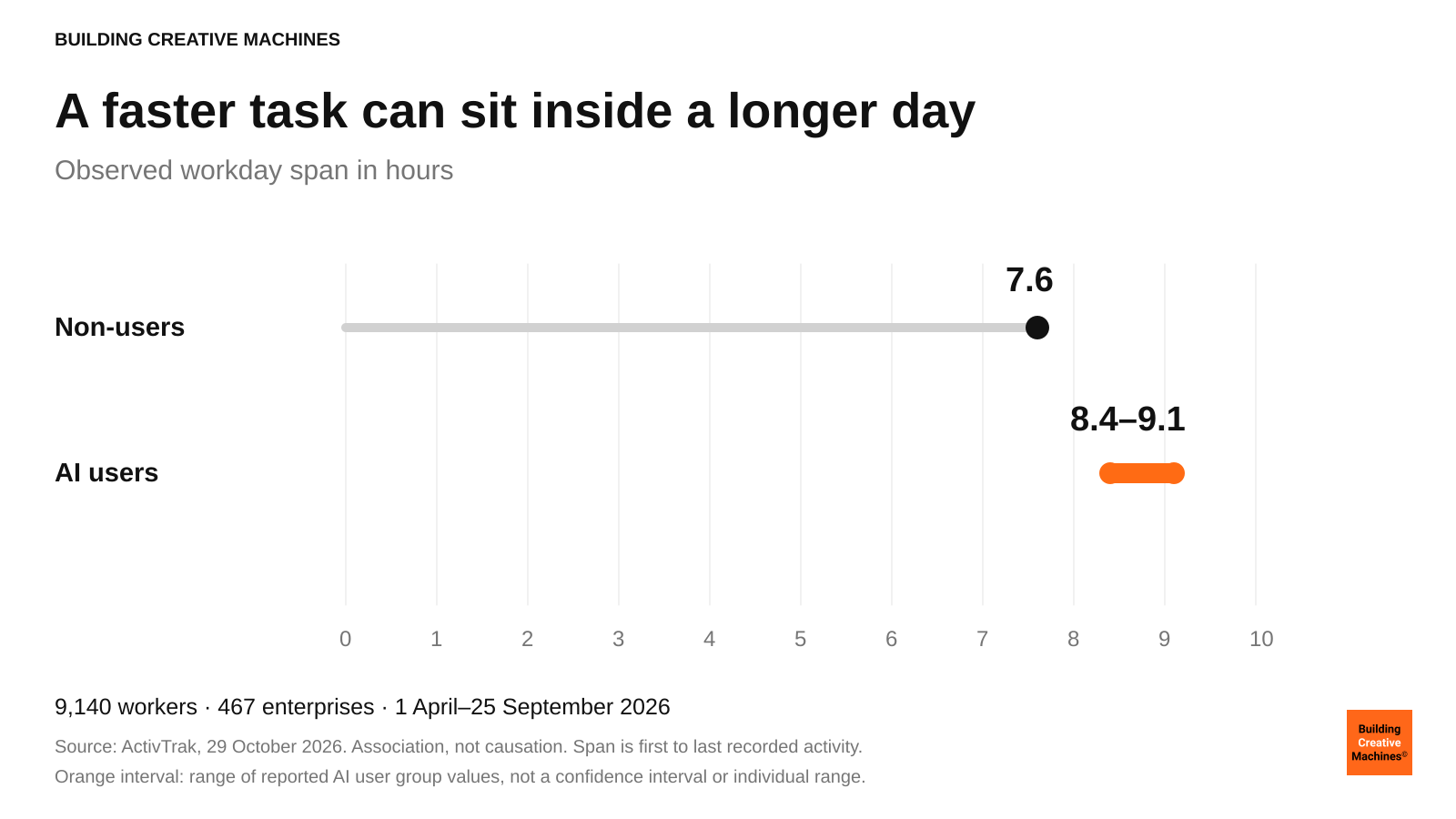
Figure 1. Workday span in ActivTrak’s sample. The orange interval represents reported AI user group values, not a confidence interval. Observational data cannot establish causality. [2, 3]
Measure the saving before spending it
First, check whether the saving survives the whole job.
Imagine a report that used to take an hour. AI produces a usable draft in ten minutes, but checking it, correcting it and moving it into the right place takes another thirty. The net saving is twenty minutes. Useful, certainly. Fifty minutes would be the wrong number to put in the business case.
This is an illustrative calculation, not a finding from either study. Its point is simple: a draft is an intermediate product. Count the time until the work is accepted, including the time another person spends fixing it.
There is good evidence that AI can improve real output. Brynjolfsson, Li and Raymond’s 2025 study of 5,172 customer-support agents found that access to an AI assistant increased the number of issues resolved per hour by 15% on average. That is a specific outcome in a specific setting, not a promise that every employee gains 15% of their day. [4]
Then do the second calculation: what will you use the recovered capacity for? That is where many AI plans become surprisingly vague.
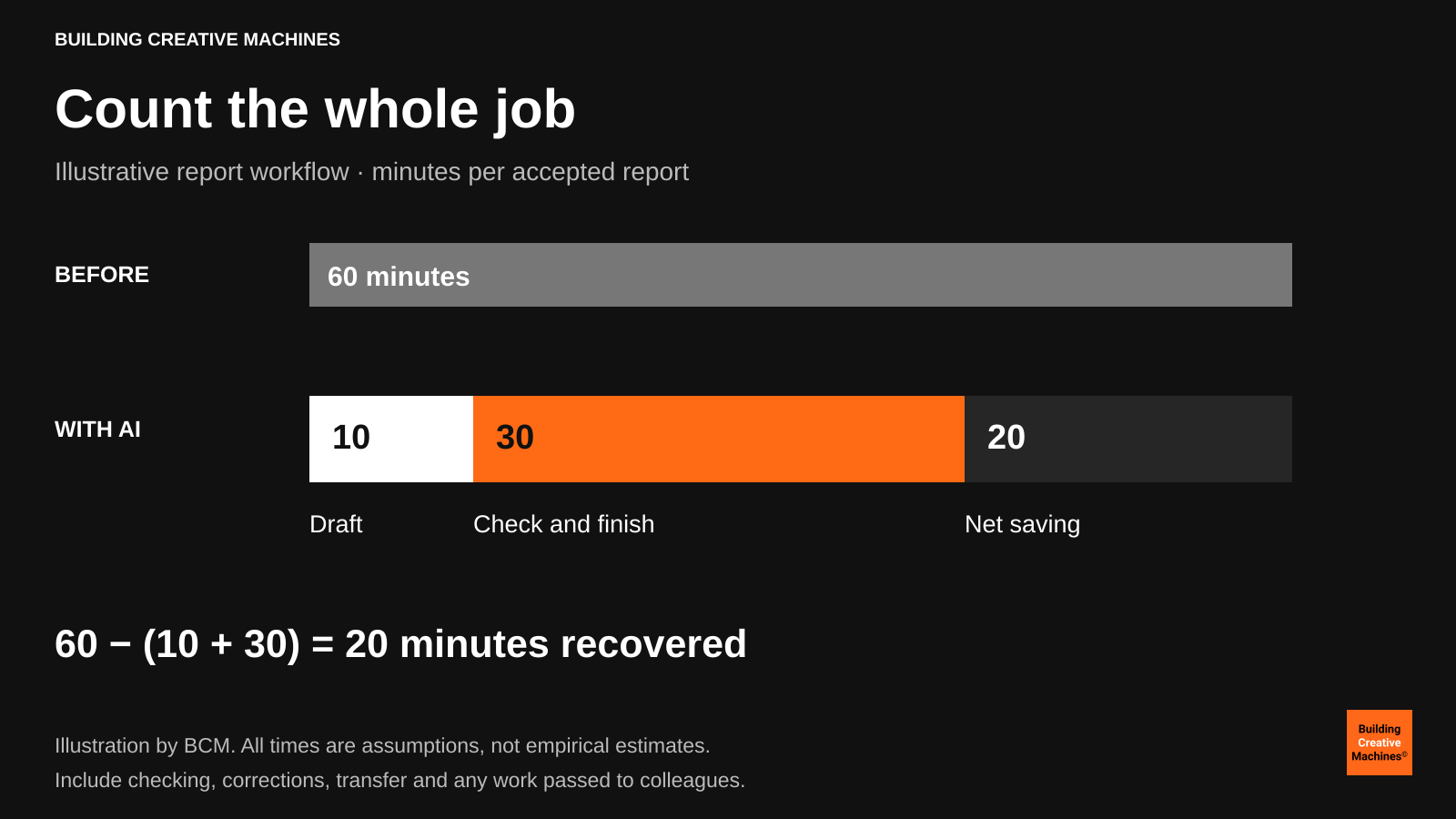
Figure 2. An illustrative one-hour report. Ten minutes of drafting plus thirty minutes of checking and finishing leaves twenty minutes of net saving. These are teaching assumptions, not research results.
Give the time somewhere to go
Suppose your team really has recovered those twenty minutes. There are several sensible things to do with them.
You could improve the work. Read the original source instead of stopping at the summary. Test an alternative design. Call the customer whose needs were flattened into a neat paragraph.
You could invest in learning. Let a junior colleague understand why the answer is right, rather than become faster at forwarding answers they cannot assess.
You could increase output. Clear a backlog, answer more customers or take on a project the team previously lacked capacity to attempt. Businesses need that option. It deserves an honest name and a proper measure of quality.
You could also reduce pressure. Leave some room for an unexpected request, protect a break or finish on time. A team operating at its limit has little capacity to absorb mistakes or surprises.
None of those outcomes arrives automatically with a software licence. And they cannot all receive the same twenty minutes in full. A business case that promises more output, more learning and shorter days needs to explain how the available gain is being shared.
For creative work, I would be particularly careful about removing all the time between a first idea and a final decision. Some of that interval is waste. Some of it is where the better idea appears.
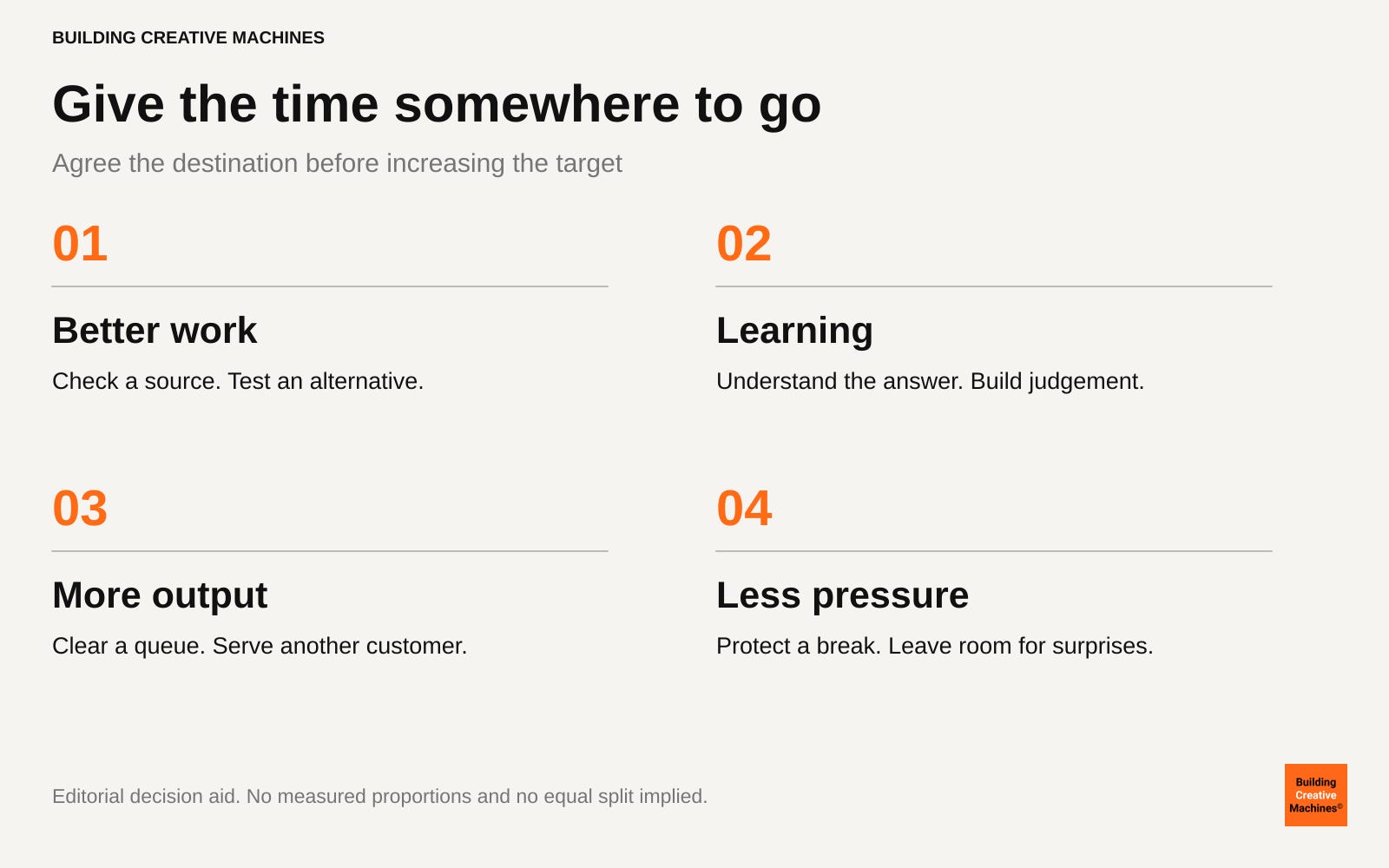
Figure 3. Four possible destinations for verified time savings. This is an editorial decision aid, not a measured allocation or a recommendation to split time equally.
Make the agreement before the target rises
A useful next step is small enough to try this week. Choose one recurring task and agree, with the people doing it, what a worthwhile improvement would look like.
Record the time to an accepted result and the amount of rework. Decide which quality checks stay in place. If you want to use any saving to increase volume, say so before the team is asked to adopt the tool. If some time is intended for learning, put it in the calendar. Otherwise the next deadline will probably claim it.
Review the work at team level. Ask whether customers receive something better, whether queues are shorter and whether work is spilling into the evening. Use proportionate, transparent measurement. A tally of prompts or screen activity is a poor substitute for understanding what people actually deliver, and an excuse for more intrusive monitoring is hardly a benefit.
You do not need a perfect experiment to start asking better questions. You do need enough discipline to avoid comparing an easy week with a difficult one and calling the difference an AI gain. Match similar tasks, note changes in staffing or demand, and revise the estimate when the work changes.
Most importantly, let the people doing the work challenge the numbers. They are likely to know which savings are real and which have simply moved to someone else’s desk.
An AI productivity policy needs a human answer
The interesting choice is what kind of working day we are trying to create.
AI may help a small business serve customers it could never previously reach. It may give a designer time to try an unfamiliar direction. It may make an overloaded team’s day manageable. Those are different ambitions, and each deserves a different test.
Buying a faster tool does not settle any of them. Before the next rollout, ask the team a plain question: if this works, what should become better about our day?
Then make sure the plan leaves room for the answer.
Follow us on Youtube and LinkedIn.
Sources
[1] Gallup. AI and Workplace Productivity What Leaders Need to Know
Published 27 July 2026; updated 10 November 2026. The 65% finding refers to May 2026, not November.
[2] ActivTrak Productivity Lab. AI Users Have Workdays Up to 90 Minutes Longer Than Non Users
29 October 2026. Commercial vendor analysis of observed digital activity. Rounded values used consistently.
[3] ActivTrak. Glossary ActivTrak for BI AI Insights
Updated 1 September 2026. Workday span definition.
[4] Erik Brynjolfsson, Danielle Li and Lindsey Raymond. Generative AI at Work
Even when a team agrees what saved time is for, the annual plan often decides otherwise. The productivity number reaches finance and comes back as a higher target. Have you seen a team actually hold on to it?
Recovered time is only recovered if someone names it. In coaching rooms the saved minutes vanish into the next request because nobody agreed what they were for. One question worth asking a team: when AI saves you time, what do you want that time to be used for? Silence in the answer is the real finding.