

People are mixing up Claude Cowork vs Claude Dispatch vs OpenClaw
Most of the confusion comes from one simple shift: we moved from chat to agents.
A chatbot answers. You still do the clicking, copying, pasting, filing, and sending.
An agent can do the work: open apps, read files, move data between tools, and finish a task end-to-end.
Once you accept that, the naming becomes clearer:
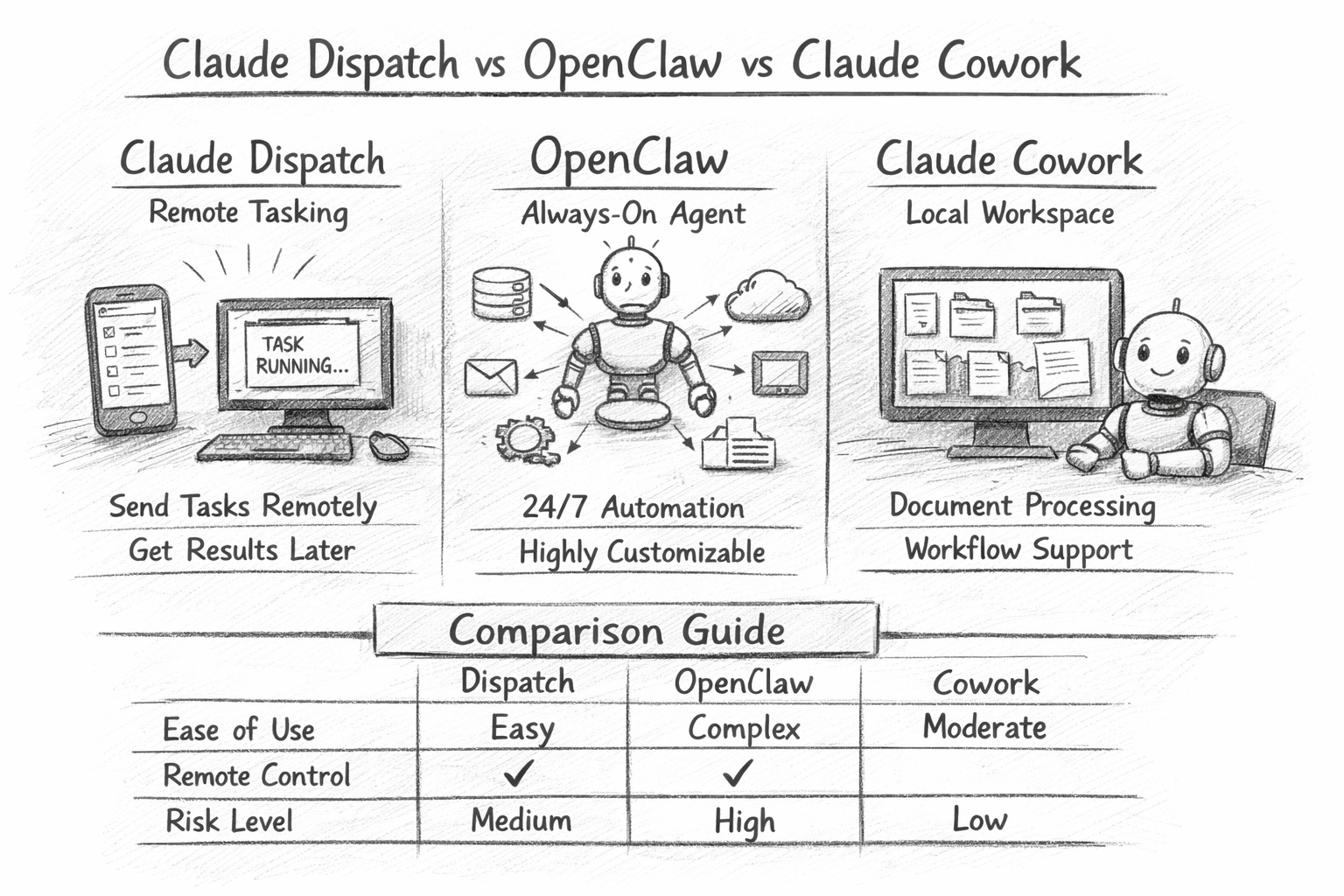
Claude Cowork = the desktop “workspace” where Claude can execute multi-step knowledge work using your files and apps.
Claude Dispatch = the remote tasking layer that lets you send Cowork tasks from your phone (or anywhere) and have Claude run them on your computer.
OpenClaw = an open-source agent ecosystem that many people run as an “always-on” personal operator, often with broad integrations and persistent behaviour.
If you remember just one line: Cowork is where the work happens. Dispatch is how you trigger it remotely. OpenClaw is a separate, open ecosystem that can be more flexible—and more exposed.
What each one actually does
1) Claude Cowork: “Outcome-first” work on your desktop
Cowork is designed for people who don’t want to prompt a chatbot 30 times. You give it an outcome (“turn these contracts into a risk summary”, “build a board pack from these files”, “draft a client update using last quarter’s numbers”) and it runs a task loop across your local context: folders, documents, and everyday apps.
Where it shines:
Extracting structured data from messy documents (PDFs, contracts, reports)
Drafting deliverables (memos, decks, briefings) from a bundle of sources
Repetitive internal workflows (weekly metrics pulls, meeting follow-ups, status digests)
Where it doesn’t replace you:
Judgement calls, approvals, and anything that is “one wrong click = incident”
Think of Cowork as: a junior analyst who can read everything fast, but must be supervised.
2) Claude Dispatch: “Send tasks now, get results later”
Dispatch is best understood as remote orchestration. It’s not a new model and not a separate agent brain. It’s a way to queue and trigger Cowork work from your phone, and (where enabled) have Claude use your computer while you’re away.
Where it shines:
“Run this every morning” tasks (scan inboxes, compile a short brief, pull a metric)
“I’m in a taxi” tasks (start a report, draft an email, prep a meeting note)
Low-friction delegation when you don’t want to open your laptop
What it changes organisationally:
Work becomes asynchronous. People start treating the agent like a background operator.
That’s powerful—but it also creates a new risk surface: delegated authority without eyes on screen.
3) OpenClaw: “Always-on autonomy” (with more responsibility on you)
OpenClaw is the one that attracts builders and power users because it often aims for:
persistent operation (24/7)
deeper custom integrations
more configurable autonomy and memory-like behaviour
That flexibility is the point—and also the problem. The more you wire an agent into real systems, the more you must assume it can be:
tricked
mis-scoped
over-permissioned
socially engineered
Recent reporting and research attention has highlighted how agent-style systems can be manipulated into harmful actions by exploiting “helpful” behaviours (for example, being guilt-tripped into doing the wrong thing). (source: WIRED)
Think of OpenClaw as: a self-hosted operations intern with keys to your building—amazing when trained, catastrophic when unmanaged.
Feature comparison
Claude Cowork
Best for: document-heavy knowledge work inside a safer, guided product
Setup: relatively straightforward (desktop app + permissions)
Control: stronger product guardrails, oversight built into the workflow
Risk profile: “enterprise-adjacent” if you treat permissions seriously
Claude Dispatch
Best for: triggering Cowork work remotely and routinely
Setup: add-on behaviour inside the Claude apps
Control: the risk is less about “Dispatch” itself and more about what you allow Cowork to do while unattended
Risk profile: operational mistakes (wrong email, wrong file, wrong copy) if you skip the review
OpenClaw
Best for: power users who want a configurable, always-on agent with broad integrations
Setup: can be simple or very deep, depending on how far you go
Control: you own the guardrails (permissions, hosting, logging, policies)
Risk profile: highest variance—can be excellent, can be a compliance nightmare
The biggest confusion: “features” vs “product names”
People compare lists like this and get lost:
“Computer use”
“Remote control”
“Plugins / skills”
“Connectors”
“Memory”
“Scheduling / cron”
“Autonomy”
Those are capabilities, not brands.
A cleaner way to compare is by operating model:
Chat mode (ChatGPT/Claude “normal”)
You ask → it answers → you act.Assisted execution (Cowork)
You ask for an outcome → it performs steps → you review and approve.Remote delegation (Dispatch + Cowork)
You send a task → it executes on your machine → you get results.Always-on autonomy (OpenClaw style)
It runs continuously, connects systems, and can act even when you're not present.
Risks you should assume on day one
If you’re deploying any agent beyond casual personal use, assume these are real:
1) Permission creep
Agents fail safely when access is tight. They fail loudly when access is broad.
Most teams start with “just make it work” permissions—then regret it.
Rule: give the agent only what it needs for the current workflow, not what it might need someday.
2) “Looks right” errors
Agents produce outputs that read cleanly but contain:
subtle numeric mistakes
wrong entity matches
outdated assumptions
confident nonsense in footnotes
Rule: treat first drafts as drafts, especially anything financial, legal, or client-facing.
3) Tool injection and social engineering
When an agent can read messages, tickets, docs, and web pages, it can be nudged by malicious or simply messy inputs.
Rule: don’t let an agent execute irreversible actions based on untrusted text (emails, DMs, web pages) without an approval step.
4) Audit and accountability gaps
“Who sent that email?” becomes “the agent did”, which becomes “who authorised the agent?”
Rule: log tasks, keep outputs, and make ownership explicit.
Where to start (for someone who has never used any of this)
Here’s a safe ramp that works in real organisations:
Step 1: Start in normal chat (1 week)
Use ChatGPT/Claude as a thinking partner:
rewrite
summarise
structure
brainstorm
build templates
Goal: learn prompting, verification habits, and what “good output” looks like in your context.
Step 2: Move to Cowork for one repeatable workflow (2–3 weeks)
Pick a workflow that is:
frequent
low-stakes
document-heavy
Good starters:
weekly internal brief from a folder of PDFs
meeting notes → action list → follow-up draft emails (but don’t send)
RFP / tender summarisation into a standard template
Step 3: Add Dispatch only after you trust the workflow
Dispatch is great once the task is stable.
If the workflow is still changing daily, remote delegation increases the likelihood of mistakes.
Start with:
“run and compile” tasks
not “send, delete, publish” tasks
Step 4: Consider OpenClaw only when you can operate it properly
If you want always-on autonomy, treat it like a system:
defined scope
clear permissions
monitoring/logging
security review
kill switch
If you can’t commit to that, you’re better off with Cowork/Dispatch.
Recommendations
Choose Claude Cowork when you want execution power with product guardrails and a clear path for non-technical teams.
Add Claude Dispatch when you want remote tasking, and you already trust the Cowork workflow enough to run unattended.
Use OpenClaw when you want maximum flexibility, and you’re willing to own the operational and security burden—because agent manipulation and misbehaviour is not theoretical.
Keep normal chatbots for anything exploratory, sensitive, or high judgment where “doing” is the dangerous part.
P.S. Also read about PicoClaw here.
Love the “safely, first” framing — most tool comparisons skip the operational boundary layer.
One practical method we’ve used is a 3-column run receipt after each test: task type, failure mode, and human-override path. It makes the Dispatch/Cowork/OpenClaw tradeoffs obvious under real workflows (not demo prompts).
If it helps, Giving Lab shares teardown-style operator notes people can reuse as an evaluation workflow: https://substack.com/@givinglab